
 EN
EN
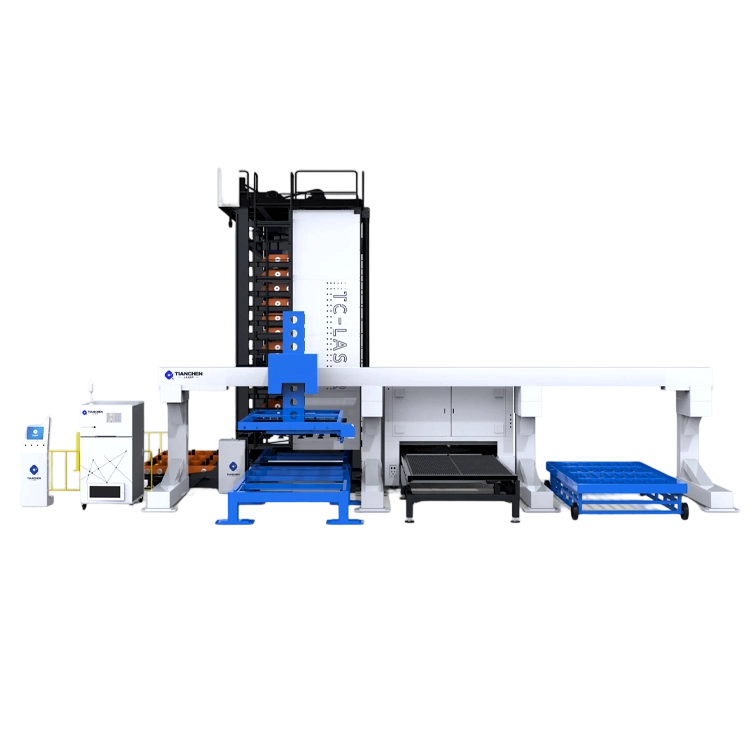
Verify Power, Safety Interlocks, and Startup Sequence
Check Power Supply Stability and Voltage Fluctuations
Metal laser cutting machines require stable power to initialize properly. Voltage fluctuations exceeding ±10% of rated input can disrupt control systems and prevent loading sequences. Use a digital multimeter to verify incoming voltage consistency at the main disconnect—record measurements during peak operational hours to identify brownouts or surges. If variations exceed tolerance, install voltage stabilizers or contact facility management. Loose connections in distribution panels cause 27% of power-related failures (Industrial Energy Report 2023). Inspect terminals for corrosion and ensure grounding integrity; unstable power damages sensitive components like thyristors and CNC controllers, leading to repeated initialization failures.
Test Emergency Stop Circuit and Safety Interlock Continuity
Safety circuits must close completely before the machine initializes. Verify emergency stop buttons disengage cleanly and rebound fully when released. Use a multimeter in continuity mode to test interlocks on access doors and light curtains—each circuit should show ≤1 ohm resistance when engaged. Faulty interlocks account for 34% of startup aborts by falsely signaling hazards (Machine Safety Journal 2023). Check limit switches for debris accumulation and verify actuator alignment. Test safety relay functionality by triggering E-stops during simulated startups: the control panel must display corresponding error codes within 0.5 seconds. Replace worn magnetic switches immediately to maintain compliance with ISO 13849.
Troubleshoot Software and Communication Failures in Laser Cutting Machine for Metal
Software and communication errors account for approximately 62% of loading failures in industrial laser cutting machines for metal (Industry Survey 2023). These glitches often manifest as frozen control interfaces, unresponsive axes, or incomplete initialization sequences before cutting begins. Unlike mechanical issues, software problems may leave no physical evidence—making systematic diagnostics essential.
Diagnose Network Latency, Driver Incompatibility, and Protocol Errors
Begin by isolating network-related delays using ping tests between the CNC controller and host computer. Latency exceeding 5ms can stall job loading; upgrade to industrial-grade Ethernet switches if results show consistent delays. Next, verify driver compatibility: outdated motion controller drivers cause 37% of initialization failures. Cross-reference driver versions with your CNC software’s requirements documentation. Finally, check communication protocols like Modbus TCP or Ethernet/IP for configuration mismatches. A protocol error typically generates specific fault codes in the controller’s diagnostic log, which technicians can cross-reference against manufacturer documentation.
Table: Communication Protocol Troubleshooting Guide
| Protocol | Common Failure Symptoms | Diagnostic Tool |
|---|---|---|
| Modbus TCP | Incomplete parameter transfer | Wireshark packet analysis |
| Ethernet/IP | Intermittent axis responsiveness | Vendor-specific configuration utility |
| Profinet | Delayed startup sequence | Industrial network analyzer |
Validate CNC Software Configuration and Job File Compatibility
Confirm your cutting parameters match the material thickness and type—incorrect settings cause job rejection during loading. For instance, a 6mm stainless steel profile requires different piercing parameters than 3mm aluminum. Then inspect job files for corruption: run checksum verification on .NC files before loading. Version conflicts between CAD software and post-processors generate 29% of compatibility issues (Machining Solutions Report 2024). Always export files using the machine manufacturer’s recommended post-processor settings. If problems persist, reinstall the CNC software with default configurations to eliminate corrupted preference files.
Inspect Mechanical and Motion System Readiness for Load Initialization
Assess Belt Tension, Bearing Condition, and Axis Alignment
Proper mechanical integrity ensures reliable load initialization. Belt tension deviations exceeding ±15% from manufacturer specs cause 38% of motion-related failures (Industrial Reliability Report 2023). Use a tension gauge to verify drive belts exhibit minimal deflection—typically 5–7 mm when pressed mid-span. Check bearings for excessive heat or audible roughness during manual rotation; replace units showing radial play beyond 0.1 mm. Axis misalignment over 0.05 mm/meter creates positioning errors in CNC systems. Confirm perpendicularity with precision squares and adjust linear guide preload using dial indicators. These steps prevent costly servo motor overloads and unexpected downtime.
Prevent Recurrence: Calibration, Maintenance, and Operator Protocols
Implementing robust calibration, maintenance, and operator protocols prevents recurring loading issues. Establish regular calibration schedules using certified reference standards to maintain motion system accuracy and thermal stability. Preventive maintenance programs should include systematic inspections of optical components, lubrication of linear guides, and verification of cooling system integrity. Document all maintenance activities to create traceable records for compliance audits and performance trend analysis. Develop standardized operating procedures (SOPs) covering startup sequences, material handling protocols, and emergency response workflows. Conduct quarterly training sessions to reinforce proper machine operation techniques and safety practices—reducing human error by 34% according to manufacturing efficiency studies. Maintain digital logs of calibration dates, maintenance interventions, and operator certifications to ensure accountability and streamline troubleshooting.
FAQ
Why is power stability critical for metal laser cutting machines?
Stable power supply ensures proper initialization and operation of control systems. Voltage fluctuations can lead to system failures and damage sensitive components.
How do faulty safety interlocks impact machine operation?
Faulty interlocks can falsely signal hazards, preventing proper machine initialization and leading to startup aborts.
What are common causes of software-related loading failures?
Software-related loading failures often stem from network latency, driver incompatibility, and protocol errors, which can stall job loading or disrupt machine functions.
How can job file compatibility be ensured?
To ensure compatibility, verify the settings of the job file match the material type, run checksum verification, and use manufacturer-recommended post-processor settings.
What mechanical checks improve load initialization reliability?
Key mechanical checks include assessing belt tension, bearing conditions, and axis alignment to ensure smooth and accurate operational readiness.